Brief Description
Elevate Your Audio Experience with the Neoteck Optical to RCA Converter
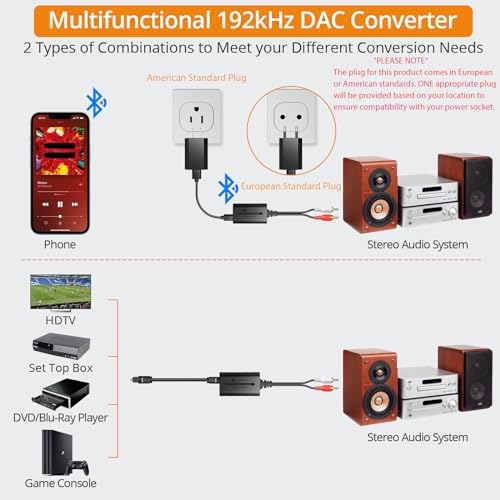
Upgrade your audio system with the Neoteck Optical to RCA Cable. Seamlessly convert optical and Bluetooth digital audio signals into stereo analog audio signals for amplifiers. Perfect for HDTVs, set-top boxes, DVD/Blu-Ray players, and gaming consoles.
Built-in Bluetooth 5.1 Receiver
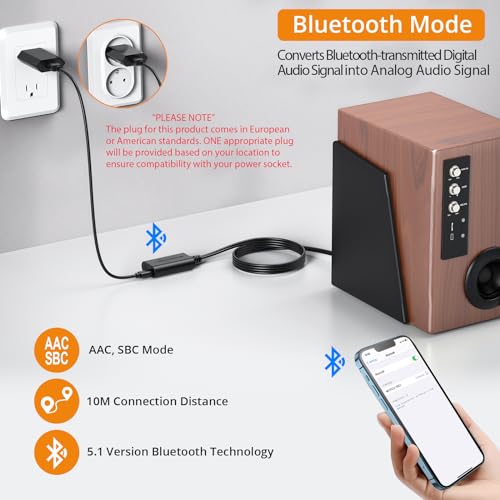
Immerse yourself in wireless audio bliss with our DAC converter featuring a built-in Bluetooth receiver. Effortlessly pair with smartphones, tablets, or computers for unrestricted audio connectivity. Equipped with cutting-edge 5.1 AAC SBC lossless transmission technology, enjoy crystal-clear sound up to 10 meters away for an enhanced audio experience.
192K/24bit DAC Converter
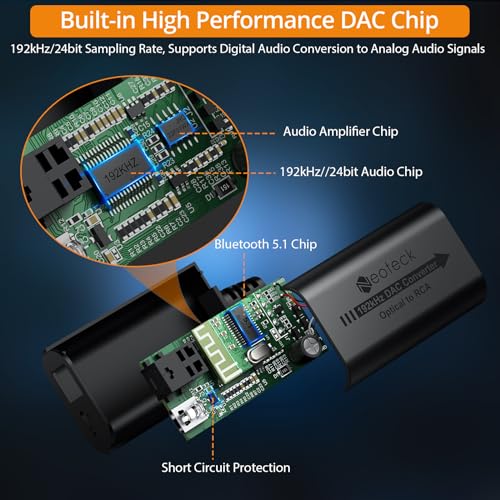
Unleash superior audio fidelity with our digital to analog converter. Supporting sampling rates up to 192kHz, this high-performance DAC audio amplifier chip amplifies RCA output levels for optimal anti-interference. Delivering pure, clear, and powerful sound, elevate your audiovisual experience to unprecedented heights.
Bluetooth Connection
- Cable Connection: Connect power adapter and Type-C power cable to the Type-C port of the RCA cable. Then, link both ends of the whole cable to sound equipment and power supply, respectively.
- Turn on Bluetooth: Pair path: Settings → Bluetooth → My Device. Then click "Neoteck RX5.0" to pair.
- Start Using: Automatically switch to Bluetooth playback mode after successful Bluetooth connection.
PCM Audio Formats
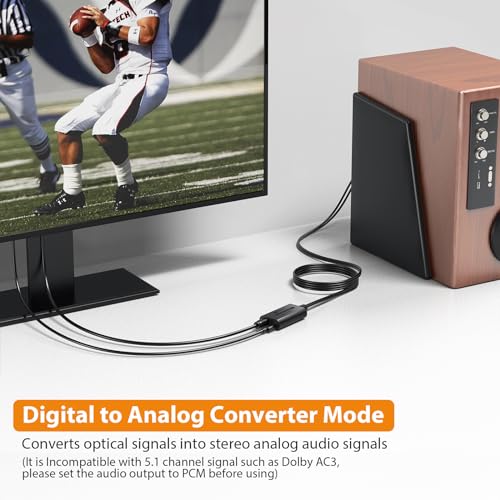
Experience unparalleled audio purity with our DAC adapter, supporting uncompressed 2.1-channel PCM digital audio signal output for electromagnetic-noise-free transmission. Compatible with HD TVs, set-top boxes, DVD/Blu-Ray players, and gaming consoles. Note: not compatible with 5.1 channel signals like Dolby AC3; ensure audio output is set to PCM for seamless operation.
Plug and Play
The Neoteck Optical to RCA Adapter simplifies your setup with a compact, lightweight design and built-in RCA cable for easy wall mounting. Effortless installation and user-friendly operation, ideal for elderly users. Widely applicable in home theaters, educational settings, conference rooms, retail stores, and more. Redefine your audio experience today.
Troubleshooting
- Not Working?
- Ensure you are using a 5V 1A power adapter. (Power plug and Type-C power cable are included in the package).
- Ensure the Type-C cable is properly connected to both the power device and the Type-C interface of the device supplying power.
- Ensure the power adapter or cable connector is securely connected, and if loose, plug it back in and reconnect the product and start using it.
- Check if the input or output mode has been changed, which could cause incompatibility problems.
Notes
- Note 1: TV Connected to Sound System through Optical Interface? The Volume button on the remote control cannot be used to directly adjust the output volume of the TV through the optical interface. (If the TV supports this feature, it's dependent on the TV model). Adjust the TV’s system settings to control the digital audio output volume.
- Note 2: Noisy Sound Production? Ensure you’re using a separable 5V 1A power adapter to connect the Type-C cable to power the DAC converter. Power supply connection: Type-C power cable - separable 5V 1A standard plug - power outlet.
- Note 3: Compatible with 5.1 Signal? Not compatible with 5.1 channel signals like Dolby AC3 or DTS. Ensure your TV audio output is set to PCM:
- Device homepage → System Setting → Image and Sound → Voice Setting → Digital Audio Output → PCM.
- Set TV audio output to SPDIF output.
- Turn on external speakers in the menu: Sound → Speaker Settings → External Speakers → ON.
